ChatGPT Prompts for Replying to Difficult Client Emails
Some links may be affiliate links. If you buy through them we may earn a commission, at no extra cost to you. We only recommend tools we have tested.
Every freelancer gets that email eventually: the client who wants “just one more small change”, disputes an invoice, or replies in ALL CAPS at 11pm. Your first reply often decides whether the project recovers or falls apart.
AI is genuinely useful here. Not because it writes better than you, but because it doesn’t get emotional. Below is a simple framework and the prompts to use with it.
The CALM framework
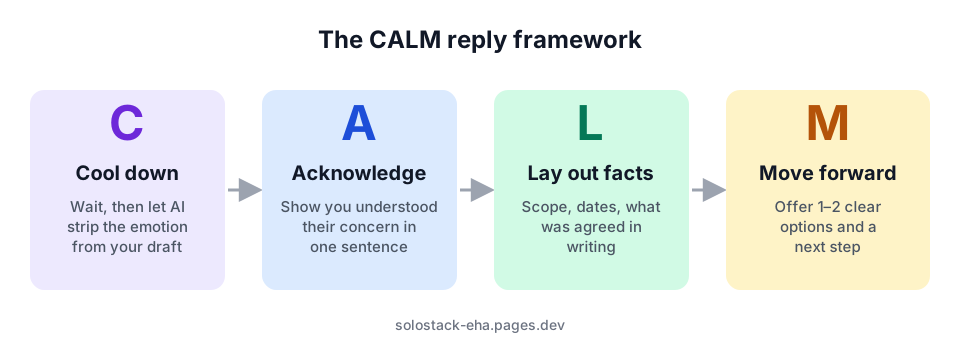
- Cool down. Never reply in the first hour. Write your angry draft if you need to, then let AI neutralise it.
- Acknowledge. One sentence that shows you understood their concern. This lowers the temperature more than anything else.
- Lay out facts. What was agreed, in writing, with dates. No blame, just the record.
- Move forward. Offer one or two concrete options and a clear next step.
Prompt 1: Neutralise your first draft
Write what you want to say, then:
Here is a draft reply to a client. Rewrite it to be calm, professional and
friendly while keeping every factual point and my position. Remove sarcasm,
blame and emotional words. Keep it under 150 words.
"""
[paste your draft]
"""
Prompt 2: Scope creep (“can you just add…”)
A client asked for extra work that is outside our agreed scope.
Agreed scope: [paste or summarise]
Their request: [paste]
Write a friendly reply that:
- says I'm happy to help
- explains this is outside the original scope, without sounding defensive
- offers two options: (a) add it for [price/time], or (b) schedule it as a
  phase 2 after the current delivery
- ends with a simple question so they can choose
Under 150 words. Warm, not corporate.
Why two options work: the client stops thinking “yes or no to paying more” and starts choosing between two ways to get what they want.
Prompt 3: Late payment, second reminder
For the first reminder, use a gentle automated email (see our guide to automatic invoice reminders with Google Sheets). When that doesn’t work:
Write a firm but polite second reminder for an unpaid invoice.
Invoice: [number], amount: [amount], due: [date], first reminder sent: [date].
Mention that work on [next milestone] will pause until payment is received,
as per our agreement. Offer to help if there's a problem with the invoice.
No threats, no guilt. Under 120 words.
Prompt 4: The angry client
A client sent this upset email:
"""
[paste their email]
"""
Facts from my side: [what actually happened, dates, what was agreed]
1. First, summarise in one sentence what they are really upset about.
2. Then write a reply using this structure: acknowledge their concern,
   state the facts neutrally, offer a concrete fix or two options, propose
   a short call. Under 180 words. Do not admit fault for things that were
   not my responsibility, and do not over-apologise.
Step 1 of that prompt is the valuable part. Often the real complaint isn’t the one in the subject line. It’s “I’m worried this will make me look bad to my boss.”
Prompt 5: Saying no to a discount request
A client asked for a 30% discount on my quote. I don't want to lower my
rate, but I could reduce the scope. Write a reply that keeps my price,
explains the value briefly, and offers a smaller package at a lower total
by removing [item]. Friendly and confident, under 120 words.
If you’re unsure your rates are right in the first place, work through how to set your freelance rates first.
Prompt 6: Ending a project gracefully
I need to end a freelance project with a client because [reason, briefly].
Write a professional email that: thanks them, states the end date, lists what
I will hand over and when, mentions the final invoice, and wishes them well.
No blame. Under 150 words.
Before you hit send: a 30-second checklist
| Check | Why |
|---|---|
| Every fact and number is correct | AI may “smooth over” details. You are responsible for them |
| No promise you can’t keep | AI drafts love “I’ll make sure this never happens again” |
| It sounds like you | Swap any phrase you would never say |
| There is one clear next step | A question, a date or a call link |
| Nothing confidential was pasted | Remove names and contract values before using AI |
The bottom line
Difficult emails are where freelancers lose clients, or earn their loyalty. Use AI as a calm second brain: let it remove the emotion, structure your reply with CALM, then add the facts and warmth only you can provide.
Frequently asked questions
Should I tell the client I used AI to write my reply?
You don't need to announce it, just as you wouldn't announce using a spell-checker. What matters is that every fact and promise in the email is yours and accurate. Never send an AI draft you haven't read and edited.
What if the client is being abusive?
AI can help you write a calm, firm boundary, but abusive behaviour is a reason to end the project. Keep records of all messages and check what your contract says about termination.
Do these prompts work in Claude and Gemini too?
Yes. They are plain-language prompts and work in any modern AI assistant. Results vary a little in tone, so always edit the draft in your own voice.
Keep reading
How to Write a Client Proposal with ChatGPT (5 Prompts That Work)
A step-by-step method for freelancers to draft winning client proposals with ChatGPT or Claude in 20 minutes, with copy-paste prompts and a checklist.
How to Set Your Freelance Rates (Formula + AI Prompts)
Work out your minimum freelance hourly rate with a simple formula, then use AI to research your market and package your services. Worked example included.