How to Create SOPs for a One-Person Business (Free Template)
Some links may be affiliate links. If you buy through them we may earn a commission, at no extra cost to you. We only recommend tools we have tested.
“Standard operating procedures” sounds like something for factories and corporations. But if you run a business alone, SOPs might help you even more. You are the only person who knows how everything works, and you’re busy, tired and forgetful like everyone else.
An SOP is simply a short, written checklist for a task you repeat. That’s it.
Why bother?
- Fewer mistakes. You stop forgetting the deposit invoice or the kickoff email.
- Less thinking. Repeated tasks become “follow the list”, saving mental energy for real work.
- Easy delegation. When you hire a virtual assistant, your SOPs are their training manual.
- A more valuable business. Documented processes are what make a business run without you.
Step 1: Pick which tasks to document first
List everything you did last week that you also did the week before. Then score each task:
| Task | Frequency | Mistakes happen? | Could delegate? | Priority |
|---|---|---|---|---|
| Onboard a new client | Monthly | Yes | Partly | ⭐⭐⭐ |
| Send invoices | Weekly | Sometimes | Yes | ⭐⭐⭐ |
| Publish a blog post | Weekly | Rarely | Yes | ⭐⭐ |
| Monthly bookkeeping | Monthly | Yes | Yes | ⭐⭐ |
| Back up files | Monthly | Forgotten! | Automate | ⭐⭐ |
Start with tasks that are frequent, error-prone and delegable. For most freelancers, that’s client onboarding and invoicing.
Step 2: Use a one-page structure
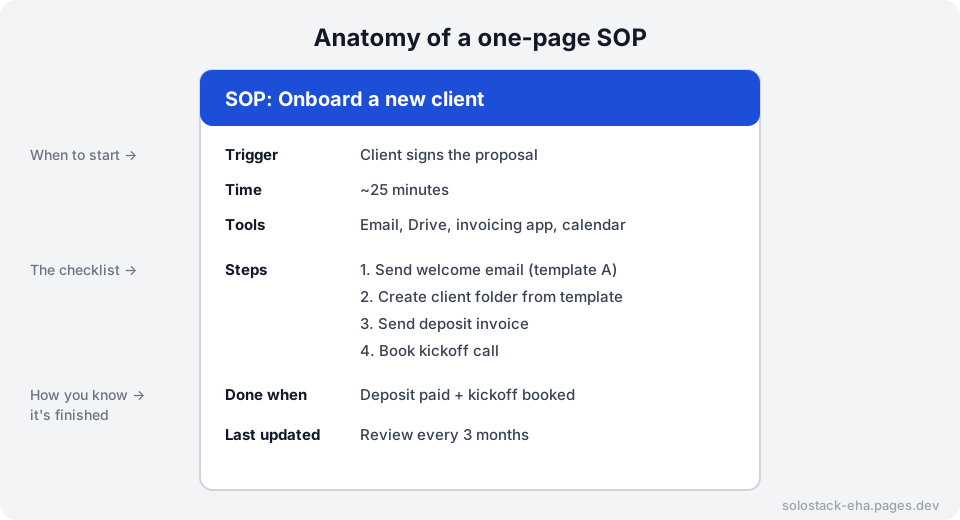
Copy this template:
SOP: [Task name]
Trigger:      [What event starts this task]
Time:         [Roughly how long it takes]
Tools:        [Apps, logins, templates needed]
Steps:
  1. [Verb + object, e.g. "Send welcome email using template A"]
  2. ...
Done when:    [Clear finish condition]
Notes:        [Common mistakes, edge cases]
Last updated: [Date]
The two most-skipped fields are the most useful: Trigger (so you know when to use the SOP) and Done when (so you know you’ve finished).
Step 3: Record yourself, then let AI write it
The fastest way to write an SOP is to do the task while narrating it. Record a voice memo or screen recording, transcribe it (many phones and meeting tools can do this), then:
Below is a transcript of me doing a task in my business. Turn it into a
one-page SOP using this structure: Trigger, Time, Tools, numbered Steps
(start each with a verb), Done when, Notes. Keep steps short. Flag any
step that seems unclear or missing.
"""
[paste transcript]
"""
That last instruction, “flag anything unclear”, is valuable. AI is good at spotting gaps you can’t see because you know the task too well.
Step 4: Test it
Next time the task comes up, follow your SOP literally, as if you’d never done it before. Each time you have to think “wait, what next?”, fix the SOP. Two or three runs make it solid.
Step 5: Store them where you work
Create one folder or page called SOPs and link to it from wherever you start the work:
- Client onboarding SOP → link from your CRM or project board (see Notion vs Trello)
- Invoicing SOP → link from your invoicing spreadsheet
- Set a calendar reminder to review all SOPs every 3 months
Then: automate the boring steps
Once a process is written down, you’ll spot steps a machine can do. Two examples:
- Chasing late payments → automatic invoice reminders
- Filing receipts → save Gmail attachments to Drive automatically
Document first, then automate. Automating a process you haven’t written down usually just automates the confusion.
The bottom line
Pick your most repeated task, write a one-page SOP for it this week, and test it next time. In a few months you’ll have a business that runs on checklists, not memory.
Frequently asked questions
Why would a solo freelancer need SOPs?
SOPs save you from re-thinking the same tasks, reduce mistakes when you're tired or busy, and make it possible to hand work to a virtual assistant or subcontractor later without weeks of training.
Where should I keep my SOPs?
Anywhere you'll actually open them: a Google Docs folder, a Notion page, or a pinned note. The best location is one click away from where you do the work.
How long should an SOP be?
One page if possible. If it's longer, the task is probably two processes and should be split.
Keep reading
How to Choose a CRM as a Freelancer: 7 Questions to Ask First
Do freelancers need a CRM? Seven practical questions to pick the right one (or decide a spreadsheet is enough), plus a simple scoring table to compare tools.
The Free Software Stack to Run a Freelance Business
Every tool category a freelancer needs (email, files, tasks, CRM, invoicing, backups), what to look for in each, and popular options with free plans.