The Free Software Stack to Run a Freelance Business
Some links may be affiliate links. If you buy through them we may earn a commission, at no extra cost to you. We only recommend tools we have tested.
You don’t need to spend hundreds a month on software to run a professional freelance business. But you do need the right tools in the right places, or you’ll waste hours hunting for files and forgetting follow-ups.
This guide covers each category, what to look for, and well-known options with free plans. Free plans and their limits change often, so always check the current details on the official pricing page.
Think in layers
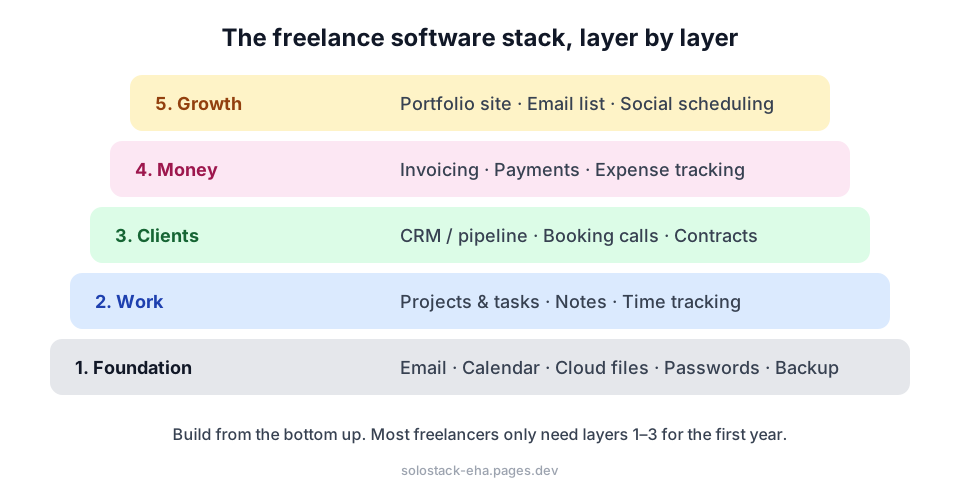
Layer 1: Foundation
Email, calendar and documents. A Google account gives you Gmail, Calendar, Docs, Sheets and Drive storage for free. Microsoft’s free Outlook and Office web apps are a solid alternative. Pick one ecosystem and stay in it, because switching between them all day wastes time.
Professional email (first upgrade). yourname@gmail.com works at the start, but you@yourbusiness.com builds trust. Some email providers offer free or low-cost plans for a custom domain. Check current offers before buying.
Password manager. Non-negotiable once you handle client logins. Look for a free plan with cross-device sync and secure sharing (Bitwarden is a popular choice with a free tier). Never store client passwords in a spreadsheet.
Backup. Cloud sync is not a backup. If you delete a file, it disappears everywhere. Keep a second copy: an external drive, or a separate cloud backup service. Set a monthly reminder.
Layer 2: Work
Projects and tasks. Trello for simple visual boards, Notion for an all-in-one workspace. Both have generous free plans. Read our Notion vs Trello comparison to choose.
Notes. If you use Notion, keep notes there. Otherwise Google Keep, Apple Notes or OneNote are free and sync everywhere.
Time tracking. Essential if you bill hourly, and useful even if you don’t: it shows which clients are actually profitable. Toggl Track and Clockify are popular options with free plans.
AI assistant. The free tiers of ChatGPT, Claude or Gemini cover most freelance writing tasks, like proposals and tricky client emails.
Layer 3: Clients
CRM / pipeline. Under about 10 active leads, a spreadsheet is enough. After that, consider a free CRM plan. Our guide How to Choose a CRM as a Freelancer has a scoring table.
Booking calls. Scheduling links stop the “does Tuesday work?” email ping-pong. Calendly and Cal.com both offer free plans, and Google Calendar has built-in booking pages on some account types.
Contracts and e-signatures. Several e-signature tools offer a small number of free documents per month, enough for most freelancers. Have a lawyer review your base contract template once.
Layer 4: Money
Invoicing. Look for: professional templates, online card payments, automatic reminders and multi-currency support if you work with US/UK clients from abroad. Several invoicing tools have free plans. Or start with a spreadsheet plus our free automatic reminder script.
Receiving international payments. Compare transfer fees and exchange-rate margins carefully. They differ a lot between providers and can quietly eat 2–5% of your income.
Receipts and expenses. Automatically save Gmail attachments to Drive so every invoice and receipt is filed by date.
Layer 5: Growth
Portfolio website. A simple static site can be hosted for free (this blog runs on a free plan). Show 3–5 case studies with results.
Design. Canva’s free plan is enough for social posts, proposals and pins.
Email list. Several newsletter tools are free up to a set number of subscribers. Start collecting emails early, because it’s the only audience you truly own.
A simple starter stack
| Need | Starter choice |
|---|---|
| Email, docs, storage | Google account |
| Passwords | Free password manager |
| Tasks | Trello |
| Time tracking | Free time tracker |
| Clients | Google Sheet → free CRM later |
| Invoices | Spreadsheet + reminder script → invoicing tool later |
| Booking | Free scheduling link |
| Design | Canva free |
Before adding any tool, ask
- What problem does this solve that I actually have today?
- Can I export my data if I leave?
- What does it cost at the next tier, when I grow?
Write down how you use each tool in a short SOP, and you’ll have a business system that’s cheap, simple and easy to hand over later.
Frequently asked questions
Are free plans good enough to run a real business?
For most solo freelancers in their first year or two, yes. Upgrade a tool when its limits actually slow you down, not before. Paying for software you don't need is one of the most common early mistakes.
What is the first paid tool worth buying?
Usually a custom-domain email address (it makes you look professional) or, once you have many clients, a proper invoicing or accounting tool.
How do I avoid losing data if a free tool shuts down?
Choose tools that let you export your data, and do an export every few months. Keep important files in your main cloud drive with a separate backup.
Keep reading
How to Choose a CRM as a Freelancer: 7 Questions to Ask First
Do freelancers need a CRM? Seven practical questions to pick the right one (or decide a spreadsheet is enough), plus a simple scoring table to compare tools.
How to Create SOPs for a One-Person Business (Free Template)
Standard operating procedures aren't just for big companies. Learn which tasks to document first and how to write a one-page SOP in 20 minutes with AI.