Notion vs Trello for Freelancers: Which Should You Use?
Some links may be affiliate links. If you buy through them we may earn a commission, at no extra cost to you. We only recommend tools we have tested.
Notion and Trello are the two tools freelancers ask about most. They overlap, but they’re built on different ideas:
- Trello is a board of cards. Every task is a card you move across columns like To do → Doing → Done.
- Notion is a workspace of pages and databases. Tasks, notes, client wikis and documents all live together, and one database can be shown as a table, board, calendar or timeline.
Quick verdict
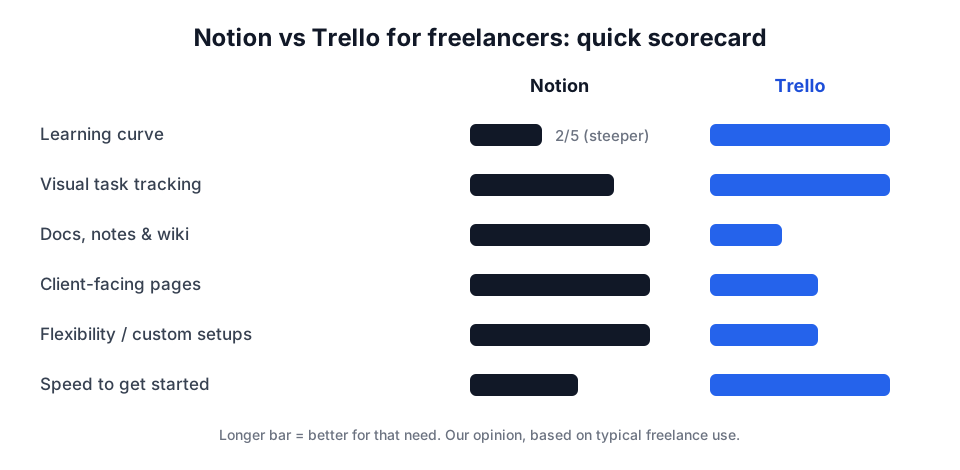
- Choose Trello if you want to be organised today, mostly track tasks, and like visual boards.
- Choose Notion if you also want notes, proposals, client portals and SOPs in one place, and you’ll invest a weekend in setting it up.
Setup time and learning curve
Trello is ready in minutes. Create a board, add three lists, add cards. There’s almost nothing to learn. That simplicity is its biggest strength: tools you actually use beat powerful tools you abandon.
Notion starts as a blank page. That’s freeing, but it also means you have to design your system: which databases, which properties, which views. Templates help a lot, but expect a few hours before it feels natural.
Task and project tracking
Both handle the core needs: due dates, checklists, assignees, labels and attachments.
- Trello’s board view is excellent for seeing all client work at a glance. Built-in automation can move cards or set due dates based on rules.
- Notion can show the same tasks as a board and a calendar and a table, filtered per client. It’s more flexible, but every view is something you set up and maintain.
Simple freelance setup in Trello: one board, lists Leads → Proposal sent → In progress → Review → Invoiced → Paid, one card per project.
Simple freelance setup in Notion: a Clients database related to a Projects database, related to a Tasks database. Show projects as a board grouped by status.
Documents, notes and SOPs
This is where Notion clearly wins. Proposals, meeting notes, a client knowledge base, your standard operating procedures… Notion handles long-form content beautifully, with headings, toggles, embeds and links between pages.
Trello cards have descriptions and comments, which is fine for short notes but not for real documents.
Sharing with clients
Both tools let you invite clients as guests to specific boards or pages.
- Trello: invite a client to a dedicated board so they can see progress and comment on cards. Clients understand it instantly.
- Notion: build a polished “client portal” page with project status, deliverables, links and FAQs, and share just that page. It looks more professional but takes more effort.
Decision guide
| If you… | Choose |
|---|---|
| Have fewer than ~5 active projects and want zero setup | Trello |
| Mostly do short, task-based jobs | Trello |
| Want one place for tasks, notes, proposals and SOPs | Notion |
| Like designing your own systems | Notion |
| Have clients who are not tech-savvy and need to see progress | Trello |
Our recommendation
Start with Trello if you’re new to freelancing or hate setup. You’ll be organised in 10 minutes. Move to Notion when you notice your notes and documents scattered across five apps. That’s the point where an all-in-one workspace pays off.
Whichever you pick, it should sit in the “Work” layer of your free freelance software stack, and it shouldn’t try to be your CRM as well unless you’re tiny (see how to choose a CRM).
Frequently asked questions
Can I use Notion and Trello together?
You can, but most freelancers end up maintaining two systems and updating neither. Pick one as your source of truth. If you need both, use Trello for tasks and Notion only for long-form documents.
Are Notion and Trello free for freelancers?
Both have free plans that many solo freelancers use for years. Limits and features change, so check the current plan details on each official pricing page before deciding.
Which is better on mobile?
Both have iOS and Android apps. Trello's simple boards are generally quicker to use on a phone. Notion's mobile app is capable but feels heavier for big workspaces.
Keep reading
How to Write a Client Proposal with ChatGPT (5 Prompts That Work)
A step-by-step method for freelancers to draft winning client proposals with ChatGPT or Claude in 20 minutes, with copy-paste prompts and a checklist.

ChatGPT Prompts for Replying to Difficult Client Emails
Copy-paste AI prompts to answer angry, demanding or scope-creeping client emails calmly and professionally, plus the 4-step CALM framework freelancers use.
How to Save Gmail Attachments to Google Drive Automatically
Automatically save invoices, receipts and client files from Gmail into a Google Drive folder with a free Apps Script. No Zapier needed, 15-minute setup.